Thursday, 6 December 2012

experimenting with photoshop.

In todays lesson, we started to play around with photoshop, in order to get used to the programme so it would be easier for us to produce our own cover and advertisement. 


I used a lot of layers to produce this and I followed the genre conventions of a hip hop song using pictures of my media teacher Dan. It was a fun process and it also made me learn alot about photoshop. 

starting on Digipaks

Today we used Photoshop to start learning how to use all the tools so we can create a digipak to a professional standard.


here I am experimenting with different effects or filters that I can use on images 

I have added a filter on the image and have included the track list at the panel which is the back of the digipak and also used an image of the street.

Now I have enlarged the photo of the artist to an appropriate size and included the name of the album as well as the name of the artist. It is important to use two fonts which make it look a lot more professional and simplistic. I also have stuck to a common colour scheme which is black, grey, white and lilac which are all subtle colours which I think fits well with the Artists image and genre of music.

This is the completed version of my Digipak task. I have used a barcode and the name of the record label.
what I have not done is included the name on the spine of the digipak, and the copyright information which is written at the back of the cover.

Final cut

The final cut of our music video I think is really good, I'm very happy with how to came out but one thing I think we need to work on are the transitions in the video. I think we created a music video that reflects in what we had originally thought of.

Digipaks


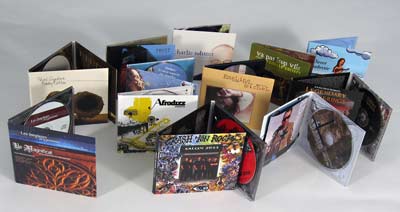
The Digipak is a similar to an album but is made out of paper or cardboard and has four panels or six. In class we talked about why digipaks were used and useful in getting interest in music. The art work also being another important factor on a digipak. The digipaks today are a new modern way of selling and packaging cd's. It helps artists design their own album. They are common to keeping the designs in digipaks constant using the same font.

Skills development

In A2 I have learnt many different techniques. 
  • To use Finalcut more effectively
During this project i have improved how to use Finalcut and have learnt about the different techniques in editing.
  • learning a different way to edit
the editing was also new and we had to learn how to properly mark in and sync our track and to make sure that we edit to the beat.
  • filming more footage
we also had to film a substantial amount of footage so we had a variety of shots within our music video.

Feedback

Wednesday, 5 December 2012

Functions of a digipak

Digipaks are a modern approach to packaging CD's. They usually contain more than 2 panels which has whatever the artist/record label has decided to put there and the usual place where the CD usually is.They are often used for special editions of CD's. Digipaks can provide more information about the artist and they can also add value to the artists material because it would be giving the audience more than just music, it provides the audience with a different outlook on the artist.
Digipaks have a consistent design scheme so the colour scheme and the font used on a digipaks would be the same throughout the entire package.